
Language
Memory
You never free memory in Burn, and you never write lifetimes, owners or borrows. The compiler works out who owns each value and frees it as soon as nothing uses it anymore. There is no garbage collector that stops the program to look for unused memory, so memory use stays low and there are no pauses.
import "std/list"

fun total(): int {
    var items = range(0, 1000)
    return items.length
}
items is freed when total returns, at that exact moment. The same happens when a variable gets a new value, when
an array element or a field is overwritten, and when a temporary value such as the result of "a" + name has been
used.
What the compiler does
Every object (strings, arrays, maps, structs, records, lambdas and any values) knows how many owners it has.
Variables, fields, array elements, map entries and running lambdas own the objects in them. When the last owner
lets go, the object is freed, and so are the objects only it owned.
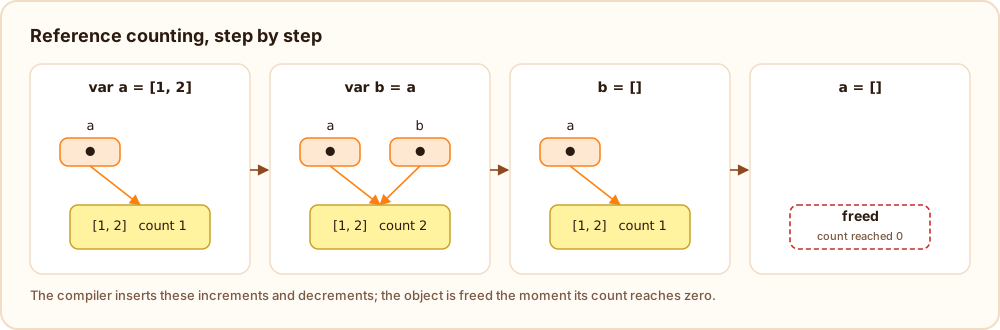
The compiler keeps the bookkeeping cheap:
- Passing a value to a function costs nothing: the caller keeps owning it, and the function borrows it.
- Returning a local variable hands it to the caller instead of copying.
- Numbers, bools and enums are not objects and are never counted.
- String literals are part of the program and are never freed.
s += piecegrows the string in place whensis its only owner, so building text in a loop takes linear time.- Async tasks get their own share of the values passed to them, so tasks can safely use the same objects.
Cycles
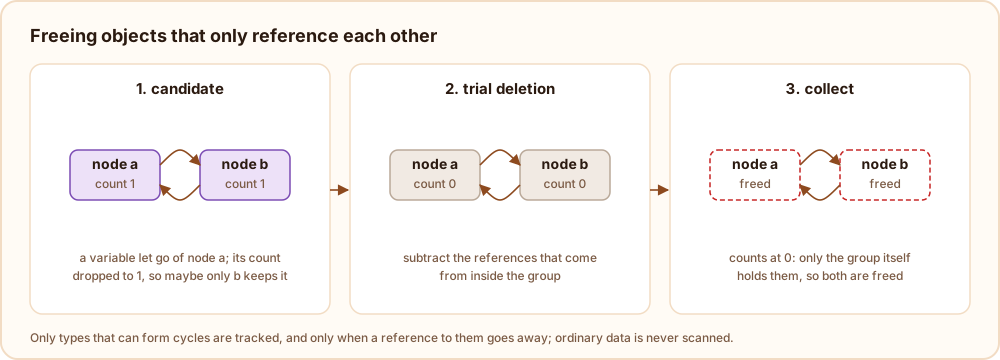
Objects that point at each other, like a parent node and its children or two structs that refer to each other, are
found and freed automatically. Burn only looks at objects whose type can actually form such a cycle (a struct with a
field of its own type, an [any], a lambda, ...), and only when a reference to one of them goes away, so programs
that never build cycles never pay for it.
def struct Node(name: string) {
    Node? next = null
}

var a = new Node("a")
var b = new Node("b")
a.next = b
b.next = a
a = new Node("other")
b = new Node("other")
After the last two lines the two old nodes only point at each other, and they are freed.
destroy
destroy x() is still available to end an object on purpose, for example to run its destroy function at a
known point. It is never needed to free memory.
Limits and settings
A program that keeps more data alive than its limit stops with an out of memory error instead of slowing the
computer down; BURN_MAX_HEAP_MB sets the limit. BURN_GC_STATS=1 prints a line each time cycles are collected.
See the command line.