
Language
Modules and visibility
Importing
import "std/date"
import "@/net/http"
import "github.com/you/colors/palette"
import (
    "json"
    "../shared/geometry.bn"
)| Import | Loads |
|---|---|
"date", "std/date" |
a module of the standard library |
"@/net/http" |
src/net/http.bn of the project the file is in, from anywhere in the project (like Rust's crate::) |
"github.com/you/colors" |
the main file of an installed package, see projects and packages |
"github.com/you/colors/palette" |
src/palette.bn of that package (like a fully qualified Java import) |
"utils", "../shared/geometry.bn" |
a file relative to the importing file, then to the current directory |
- Folders inside
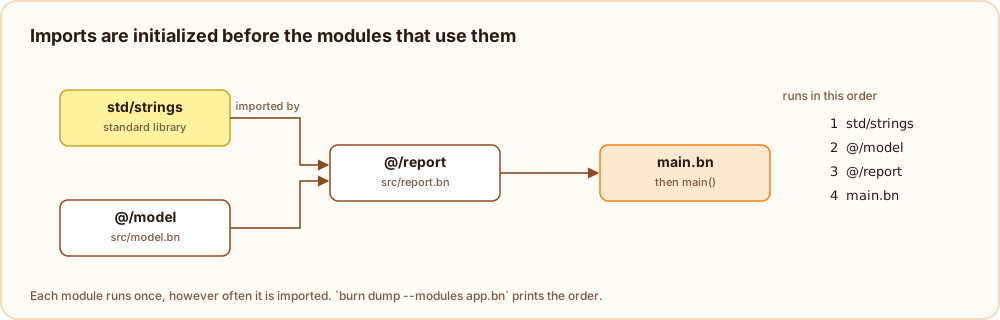
src/are packages:src/net/http.bnis the modulenet/http. A folder can also be imported as a whole when it has amod.bn:import "@/net"loadssrc/net/mod.bn. .bnis optional everywhere.- Each module is loaded once, and its top level statements run once, before the importing module.
pub and priv
Everything declared at the top level of a module is visible to modules that import it, unless it is marked
priv. pub makes the intent explicit.
import "std/math"

pub def type Vec2 {
    float x
    float y
}

pub fun length(v: Vec2): float {
    return sqrt(square(v.x) + square(v.y))
}

priv fun square(x: float): float {
    return x * x
}

priv var created = 0
Using a private name from another module is a compile error (`square` is private to its module).
Imports are not re-exported: a module sees its own names and the public names of the modules it imports directly.
If two imports define the same name, using it is reported as ambiguous.
Names from several modules
Importing a module brings its public names into the importing file, unqualified: after import "std/strings",
padLeft is just padLeft. To keep a module's names apart from your own, import it with an alias
instead.
- A name declared in the file itself takes precedence over an imported one with the same name.
- When two imported modules both define a name and the file does not, using it is an error that names both modules:
"
areais ambiguous: it is defined in geo.bn and shapes.bn". Rename one of them, or declare a function in your own file that calls the one you mean. - Only names are imported, never statements: importing a module twice, or from several files, loads and runs it once.
Import aliases
Available since Burn
26.1.0-experimental-6.
import "path" as Name loads a module without bringing its names into the file. They are used through the alias
instead, as Name.something:
import "std/memory" as Mem
import "std/math" as M
import "../shared/geometry.bn" as Geo

var v = Geo.make(3.0, 4.0)
print(Geo.length(v), M.PI, M.sqrt(16.0), M.Math.gcd(12, 18))

unsafe {
    var p = Mem.Memory.alloc(8)
    Mem.Memory.store64(p, 99)
    print(Mem.Memory.load64(p))  // 99
    Mem.Memory.free(p)
}
An alias works everywhere the name it stands for works:
| Where | Example |
|---|---|
| values and functions | Geo.make(1.0, 2.0), M.PI |
| the standard library's built-in functions | M.sqrt(2.0), M.max(a, b) |
| static members | M.Math.gcd(12, 18), Mem.Memory.alloc(16) |
| types | Geo.Vec2 v = ..., fun norm(a: Geo.Vec2): float, [Geo.Vec2], Geo.Vec2? |
| creating values | new Geo.Point(1, 2), Geo.Vec2 { x: 1.0, y: 2.0 }, new C.Stack<int>() |
enums and match |
Tok.Token.End, Tok.Token.Word(text) => ... |
| string templates | "${Geo.length(v)}" |
An alias can be used in an import list too, next to plain imports:
import (
    "std/collections" as C
    "std/list"
)
Only the module's public names are reachable through the alias; private ones are reported as private.
The alias is a name of its own in the file: it cannot also be the name of something the file declares, and one alias names one module. The same module can be imported once with an alias and once without.
The module is still loaded and initialized only once, however it is imported.
Mistakes point at the alias:
error: `M` (the module `std/math`) has no public name `Maht`
 --> app.bn:3:7
  |
3 | print(M.Maht.gcd(12, 18))
  |       ^^^^^^
help: did you mean `M.Math`?
Forgetting the alias gets a suggestion too: with import "std/memory" as Mem, a plain Memory.alloc(8) reports
"cannot find Memory in this scope" with help: did you mean `Mem.Memory`?. The language server completes the
names of a module after Alias., and the members of a type after Alias.Type..
Imports inside functions and blocks
Available since Burn
26.1.0-experimental-6.
An import can also stand inside a function, a method or any block. What it imports is then visible only there,
from the import to the end of the block, and in the lambdas written inside it:
fun root(x: float): float {
    import "std/math"
    return sqrt(x)
}

fun cube(x: int): int {
    if (x > 0) {
        import "std/math" as M
        return M.pow(x, 3)
    }
    return 0
}

fun scaled(xs: [float]): [float] {
    import (
        "std/list"
        "std/math"
    )
    return map(xs, fun(x: float): float { return floor(x * 2.5) })
}

print(root(49.0), cube(3), scaled([1.0, 2.0]))  // 7.0 27 [2.0, 5.0]
Outside the block the names are gone again, so using them is an error like any other unknown name:
error: `sqrt` is in the standard library module `std/math`
 --> app.bn:6:12
  |
6 |     return sqrt(9.0)
  |            ^^^^
help: import it with `import "std/math"`- Use a local import to keep a module that only one function needs out of the rest of the file, or to give a module a short alias right where it is used.
- Only the names are local. The module is loaded with the program and initialized once, before the file that
imports it, wherever the
importstands; a block that runs many times does not load it again. - Names from a local import come after the file's own names, like any import, and two imports that define the same name make it ambiguous where both are visible.
- Bytecode libraries can only be imported at the top level of a file.
Initialization order
Each module's top level statements run once, before the statements of the modules that import it, and the program's
own file runs last (followed by main, if there is one). Imports can form cycles, for example two modules that call
each other's functions; Burn then picks an order that runs each module after as many of its imports as possible, and
burn dump --modules app.bn shows it. Globals that one module reads from another during initialization should
therefore not depend on a cycle.
The standard library
| Module | Contents |
|---|---|
std/math |
PI, E, TAU, the Math helpers and the math functions (page) |
std/strings |
padding, lines, words and character tests (page) |
std/list |
map, filter, reduce, sortBy, range and other array helpers (page) |
std/collections |
sets, stacks, queues and counters (page) |
std/fs, std/path |
files, folders and paths (page) |
std/process |
arguments, environment, running programs, exit and panic (page) |
std/json |
JSON.parse, JSON.stringify (page) |
std/http |
HTTP requests (page) |
std/date, std/time |
dates, times, sleep (date, time) |
std/random |
random numbers (page) |
std/testing |
test, expectEqual and friends (page) |
std/memory |
raw memory for unsafe code: Memory.alloc, loads, stores, copy and fill (page) |
The std/ prefix is optional (import "math"). When a program uses a standard library function without importing its
module, the error says which module to import, and burn fix adds the import.